Understanding Wifi: How Does it Work?
Wifi, a staple of modern connectivity, is crucial to our daily lives. It enables wireless internet access, powering everything from smartphones and laptops to smart home devices. But how does wifi work, and what makes it so essential? This article explores the inner workings of wifi, answering a plethora of common queries to give you a comprehensive understanding.
What is Wifi?
Wifi, which stands for Wireless Fidelity, is a technology that allows devices to connect to the internet and communicate wirelessly. It functions by utilizing radio waves to transmit data between a device and a wireless router. This connection facilitates high-speed internet access without the need for physical cables.
How Does Wifi Work?
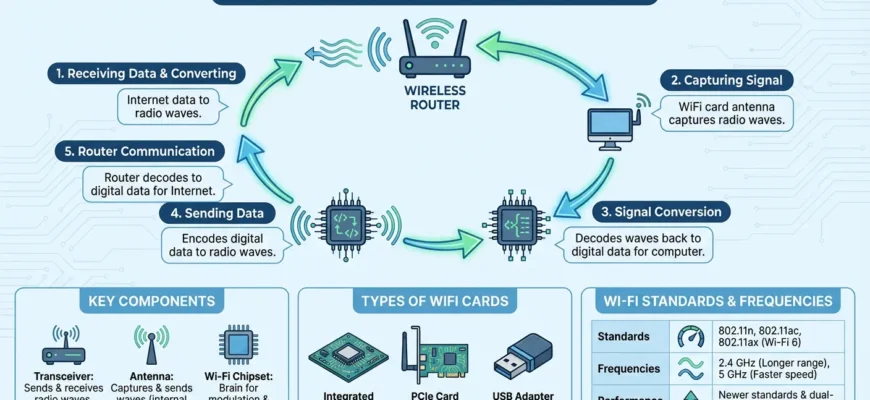
Wifi operates by sending and receiving data over radio bands. The process begins with an internet connection fed into a wireless router. This router converts the data into radio signals, broadcasting them to nearby wifi-enabled devices. These devices, equipped with wifi adapters, intercept and decode the signals, allowing users to access the internet wirelessly.
The Role of Wireless Routers
- Routers: Act as the central hub for wifi communication.
- Frequency Bands: Typically use 2.4 GHz and 5 GHz bands to transmit data.
- Protocols: Wifi operates according to certain standards, with 802.11ac being one of the newest and fastest.
Wireless routers manage the flow of data, ensuring that information reaches the intended recipient. Routers can handle numerous devices simultaneously, making them essential for both home and business networks.
Types of Wifi Devices
Various devices utilize wifi technology to connect to the internet, including:
- Smartphones and Tablets: Allow internet access on the go.
- Laptops and PCs: Essential for both work and entertainment.
- Smart Home Devices: Include smart TVs, speakers, and security systems, all requiring wifi for connectivity.
Benefits of Using Wifi
The advent of wifi has revolutionized connectivity, offering several advantages:
- Mobility: Allows users to move freely while staying connected.
- Convenience: Eliminates the need for cumbersome cables.
- Scalability: Easy to expand network by adding new devices.
Common Wifi Issues and Solutions
Despite its benefits, wifi can present challenges. Here are common issues and their solutions:
- Poor Signal Strength: Often caused by distance from the router or physical obstructions. Solution: Use wifi extenders or position the router centrally.
- Slow Internet Speeds: Can result from interference or limited bandwidth. Solution: Limit background applications and upgrade the router if necessary.
- Connection Drops: May occur due to outdated router firmware. Solution: Regularly update firmware and check device compatibility.
Understanding Wifi Security
Security is paramount when using wifi. Key measures include:
- Encryption: WPA3 offers robust encryption against unauthorized access.
- Strong Passwords: Use complex passwords to prevent unwanted access.
- Network Monitoring: Regularly review connected devices and network activity.
Emerging Wifi Technologies
Wifi technology continues to evolve, with new advancements such as:
- Wifi 6: Provides faster speeds, increased capacity, and better performance in busy environments.
- Mesh Networks: Enhance coverage by using multiple nodes.
- Li-Fi: Utilizes light waves for data transmission, promising higher speeds.
FAQs About Wifi
Below are some frequently asked questions about wifi.
- What is the range of a typical home wifi network? The range is usually around 150 feet indoors and 300 feet outdoors, depending on obstructions and frequency bands used.
- Can wifi affect my health? Current research indicates that wifi is safe for human health. It emits non-ionizing radiation, which is far less harmful than ionizing radiation.
- How can I boost my wifi signal? To enhance the signal, position your router in a central location, reduce interference from other electronic devices, and consider using wifi extenders.
- What do different wifi standards mean? Wifi standards, such as 802.11n or 802.11ac, refer to protocols that determine the speed and range of wireless networks.
- Is it possible to set up a guest network? Yes, most modern routers allow you to create a separate guest network to protect your main network from unauthorized access.







